

Ultimate Toggle Studio
 ⛧°. ⋆༺𝐜𝐡𝐢𝐜𝐤𝐞𝐧𝐦𝐚𝐚𝐬𝐭𝐞𝐫༻⋆. °⛧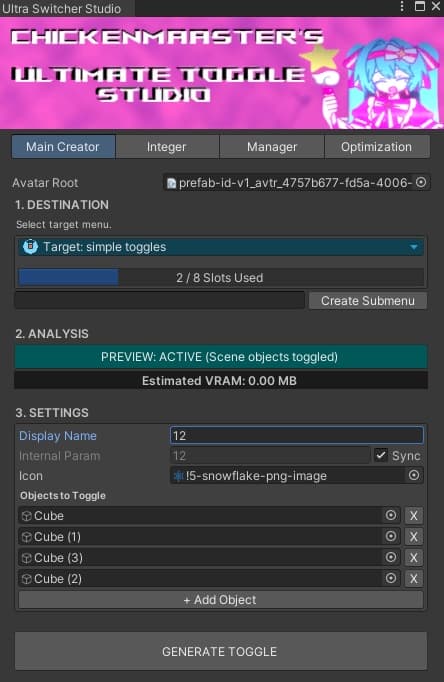
説明
-----------------------------Ultimate Toggle Studio--------------------------------- Create professional-quality avatar toggles in minutes with Chicken Master’s Ultimate Toggle Studio, an all-in-one Unity editor tool built for VRChat creators who want speed, control, and zero headaches. Once installed, a new Chicken Master menu appears directly in Unity, giving you instant access to every tool in the suite through a clean, dedicated interface.
With the Main Creator, building simple toggles is effortless: drop in your avatar, choose or create an expression menu, see available slots at a glance, name your toggle, pick an icon, and assign one or multiple objects—then generate. Done. Your toggle is upload-ready with no manual animator or parameter setup.
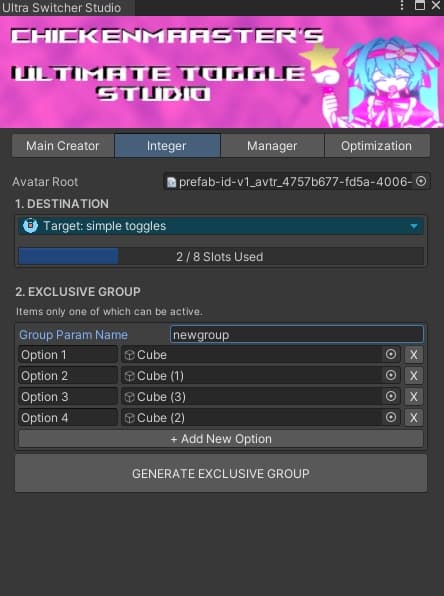
Need exclusivity? The Integer tab lets you create grouped toggles where only one option can be active at a time—perfect for hats, outfits, hairstyles, or accessories. Add your objects, generate the exclusive group, and the tool handles the logic automatically while keeping you within VRChat menu limits using a built-in slot counter.
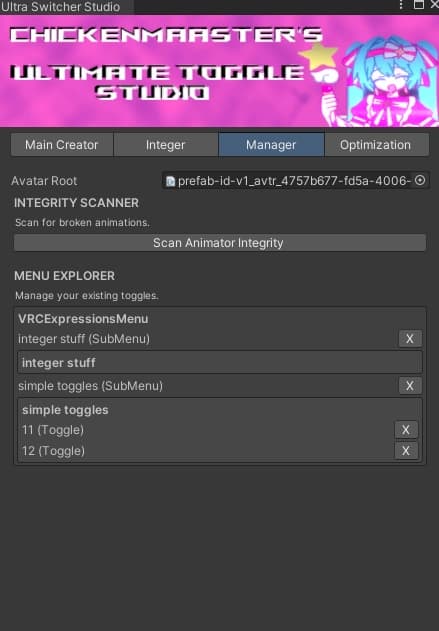
The Manager tab gives you full control over everything you’ve created. View all toggles and sub-menus on your avatar, remove mistakes instantly, and scan for broken animations to keep your layers clean and optimized—no digging through Unity assets required.
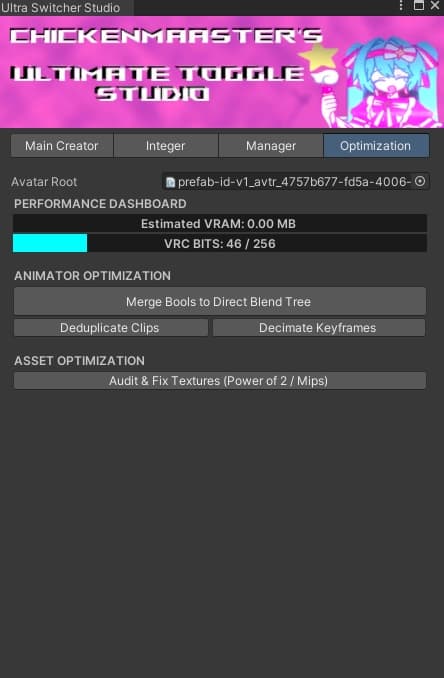
For advanced users and booth-ready avatars, the Optimization tab provides insight into bits and VRAM usage, helping you manage size and performance on larger models without guesswork.
Whether you’re a beginner or a seasoned avatar creator, Ultimate Toggle Studio streamlines your workflow, reduces errors, and saves hours of setup time. Available now on the Booth store and through the Discord—build smarter toggles, faster.
Ultimate Toggle Studio — Unity & VRChat向け 高速・クリーン・高機能トグル作成ツール
Chicken Master の Ultimate Toggle Studio は、スピード・操作性・安定性を重視した、VRChatアバター制作者のためのオールインワンUnityエディターツールです。インストール後、Unity上部に 「Chicken Master」 メニューが追加され、専用で分かりやすいUIからすべての機能にすぐアクセスできます。
Main Creator タブでは、シンプルなトグルを数分で作成できます。アバターをドラッグ&ドロップし、エクスプレッションメニューを選択または新規作成すると、空きスロット数を一目で確認可能。名前の設定、アイコン選択、オブジェクトの追加(複数対応)を行い、生成するだけでアップロード可能なトグルが完成します。AnimatorやParameterの手動設定は不要です。
Integer タブでは、同時に1つだけ有効になる排他的トグルグループを作成できます。帽子・衣装・髪型・アクセサリーなどに最適です。オブジェクトを追加して生成するだけで、内部ロジックは自動処理。メニュー制限を超えないよう、スロットカウンターで常に管理できます。
Manager タブでは、作成済みまたは既存のトグルやサブメニューをすべて管理可能。不要なトグルやサブメニューはワンクリックで削除でき、壊れたアニメーションのスキャン機能でレイヤーをクリーンに保てます。Unity内を探し回る必要はありません。
Optimization タブでは、bitsやVRAM使用量を確認できます。特にBooth向けの大容量アバターを想定した機能で、上級者がサイズやパフォーマンスを管理するのに最適です。意味が分からない場合は触らなくても問題ありません。
初心者から上級者まで、Ultimate Toggle Studio は作業時間を大幅に短縮し、ミスを減らし、よりスマートなトグル制作を可能にします。BoothストアおよびDiscordで配布中。 速く、簡単に、プロ品質のトグルを。