

Ever's Outfit Binder|衣装ボーン自動配置ツール
 Ever_Shop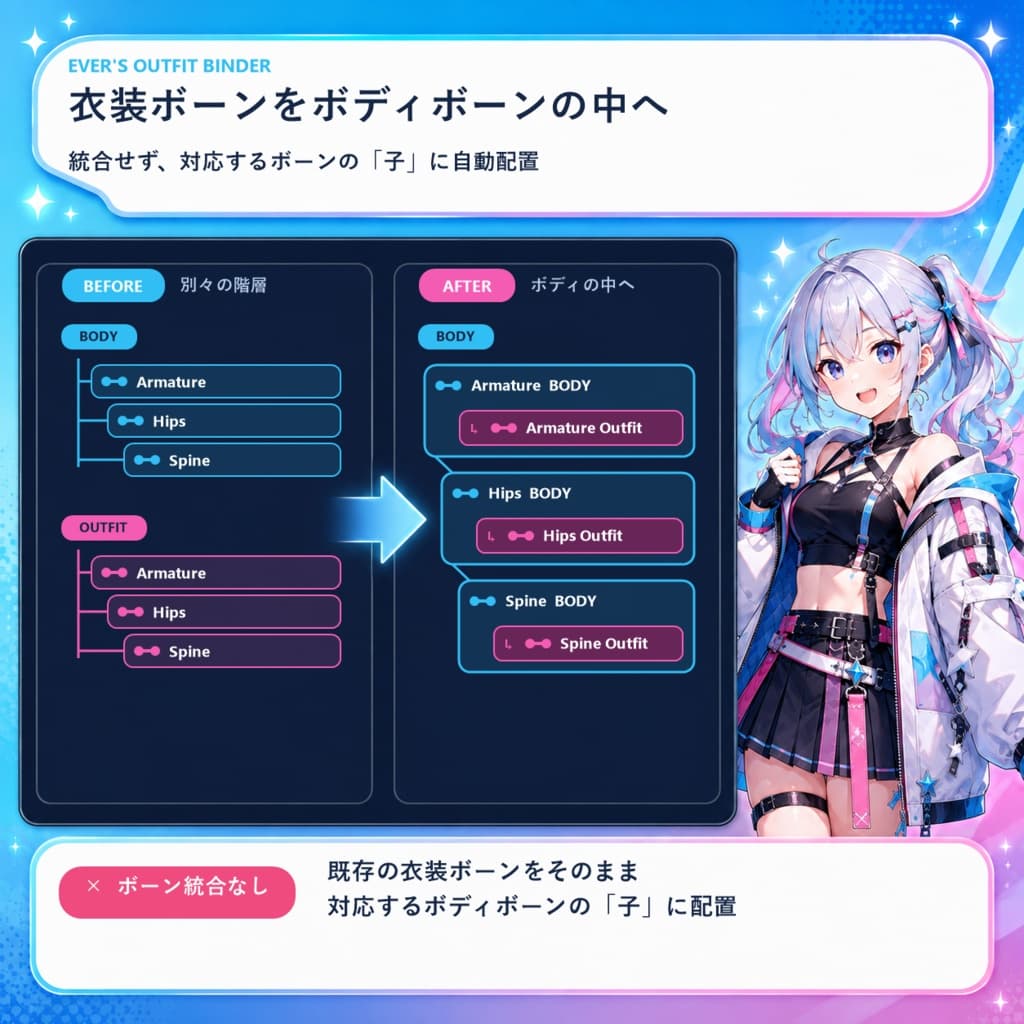
説明
Ever's Outfit Binder v1.1.0 衣装の既存ボーンを、対応するアバターのボディボーン配下へ自動配置する無料のUnityエディター拡張です。 한국어 / English / 日本語
【重要:このツールが行うこと】 ボーンを一つに統合したり、削除・置換したりするツールではありません。 衣装側にすでに存在するボーンを、対応するボディ側ボーンの子としてHierarchy上に再配置します。衣装ボーンのオブジェクトとSkinnedMeshRendererの参照を維持したまま、着せ替え作業で必要な親子構造と名前を整理します。
【日本語】 ボディルートと衣装ルートを指定すると、Humanoidの役割、一般的なボーン名・別名、左右、親子階層を比較して接続候補を作成します。実行前に一覧で確認でき、処理全体はUnityのUndo一回で元に戻せます。
主な機能 ・Armature、Hips、Spine、腕、脚などの衣装ボーンを対応するボディボーン配下へ自動配置 ・衣装に指ボーンがある場合、Thumb / Index / Middle / Ring / Littleも自動対応 ・衣装ボーン名を「元の名前 + 半角スペース1個 + 衣装ルート名」で統一(Armatureを含む) ・Breast / BustとButt / Gluteは初期設定で対象外。必要な場合のみオプションで有効化 ・support / sub / twist / helper系の腕補助ボーンは自動処理から除外 ・ボディ側に存在しないEnd / Nub / Tipや装飾ボーンは衣装階層にそのまま保持 ・NeckやHeadが0.9などに調整されたボディでも、衣装ボーンへスケールを継承可能 ・処理後、衣装ルートをボディルート配下へ自動配置 ・韓国語 / English / 日本語UI
変更しないもの ・メッシュ、ウェイト、bindpose、ブレンドシェイプ、マテリアル ・SkinnedMeshRenderer.bones / rootBoneのオブジェクト参照 ・元のFBX・Prefabアセット ・Magica Cloth / PhysBone設定
使い方
- ZIPを展開し、unitypackageをUnityプロジェクトへインポートします。
- HierarchyへボディPrefabと衣装FBX / Prefabを配置します。
- Tools → Ever's Outfit Binderを開きます。
- ボディルートと衣装ルートを指定します。
- 「接続リストを確認」で結果を確認し、「衣装ボーンを自動接続」を実行します。
- Hierarchyを確認した後、シーンまたはPrefabを保存します。
インストール先:Assets/_Ever's/OutfitBinder
検証環境 ・Unity 2022.3.22f1 / 6000.3.18f1:コンパイルおよび9項目の自動テストで検証済み。 ・Unity 2019.4.31f1:API互換のコンパイル確認のみ。エディターでの実行確認は未完了です。
【한국어】 바디 루트와 의상 루트를 비교하여, 의상에 이미 존재하는 본을 대응되는 바디 본의 자식으로 자동 배치하는 Unity 에디터 툴입니다.
본을 하나로 합치거나 삭제·교체하는 툴이 아닙니다. 의상 본 오브젝트와 SkinnedMeshRenderer의 본 참조는 유지하면서 Hierarchy의 부모·자식 관계를 정리합니다.
Humanoid 역할, 일반적인 본 이름과 별칭, 좌우 및 계층 구조를 함께 비교합니다. Armature부터 몸통·팔·다리까지 연결하며, 의상에 손가락 본이 있으면 손가락도 작업합니다. Breast/Bust와 Butt/Glute는 기본 제외되고 옵션을 켰을 때만 연결합니다. 바디에 없는 End 본이나 장식 본은 의상 계층에 그대로 남습니다.
의상 본 이름은 「원래 이름 + 공백 한 칸 + 현재 의상 루트 이름」으로 정리됩니다. Neck 또는 Head 스케일이 조정된 바디도 스케일 상속 옵션으로 대응할 수 있습니다. 실행 전 연결 목록을 확인할 수 있고 전체 작업은 Ctrl+Z 한 번으로 되돌릴 수 있습니다.
Tools → Ever's Outfit Binder에서 실행하고 오른쪽 위에서 언어를 선택하세요. Unity 2022.3.22f1 / 6000.3.18f1은 9개 자동 검증을 완료했습니다. Unity 2019.4.31f1은 API 컴파일 확인만 완료했으며 실제 에디터 실행은 미검증입니다.
【English】 Ever's Outfit Binder is a free Unity Editor tool that places existing outfit bones under their corresponding avatar body bones.
It does not merge, delete, or replace bones. It reorganizes the Hierarchy parent-child relationships while preserving the outfit bone objects and the SkinnedMeshRenderer bone references.
The matcher compares Humanoid roles, common bone names and aliases, left/right sides, and hierarchy context. It supports the main torso, arm and leg chains, plus finger bones when present. Breast/Bust and Butt/Glute bones are excluded by default and can be enabled separately. Unmatched End/Nub/Tip and accessory bones remain in the outfit hierarchy. The body-scale option lets outfits inherit adjusted Neck or Head scales such as 0.9.
Preview the complete connection list before applying. The whole operation can be reverted with one Unity Undo. Open Tools → Ever's Outfit Binder and choose Korean, English, or Japanese at the top right. Unity 2022.3.22f1 and 6000.3.18f1 passed all 9 automated validation scenarios. Unity 2019.4.31f1 passed API compilation checks only; Editor execution is not yet verified.
【ご利用前に / 사용 전 / Before use】 ・作業前にプロジェクトをバックアップし、接続リストを確認してください。 ・작업 전 프로젝트를 백업하고 연결 목록을 확인하세요. ・Back up your project and review the connection list before applying. ・ボディと衣装は同じ通常シーン内の別々のHierarchyルートに配置してください。Prefab Mode / Play Modeでは実行できません。 ・바디와 의상은 같은 일반 씬의 서로 다른 Hierarchy 루트에 배치해야 합니다. Prefab Mode / Play Mode에서는 실행할 수 없습니다. ・Place the body and outfit as separate Hierarchy roots in the same regular scene. Prefab Mode and Play Mode are not supported. ・シーンやPrefabは自動保存されません。衣装アニメーションのボーンパスは書き換えません。 ・씬과 프리팹은 자동 저장되지 않으며 의상 애니메이션의 본 경로는 다시 작성하지 않습니다. ・Scenes and prefabs are not saved automatically. Animation binding paths are not rewritten. ・アバター・衣装モデルは付属しません。使用するモデルの利用規約に従ってください。 ・아바타·의상 모델은 포함되지 않습니다. 사용하는 모델의 이용규약을 따라주세요. ・Avatar and outfit models are not included. Follow the license terms of the models you use.
内容 / 구성 / Contents EversOutfitBinder_v1.1.0.zip ZIPを展開してからunitypackageをインポートしてください。 ZIP 압축을 푼 뒤 unitypackage를 임포트하세요. Extract the ZIP, then import the unitypackage.
Included: EversOutfitBinder_v1.1.0.unitypackage + README.md
Creator: Ever X: https://x.com/EVER_VRM
【AI使用について / AI 사용 안내 / AI usage】 本ツールの開発および商品紹介画像の制作にAIを使用しています。 본 툴의 개발 및 상품 소개 이미지 제작에 AI를 사용했습니다. AI was used in the development of this tool and the creation of its product images.