

Molkky
 itzdaigajsesammi
説明
🪵 MÖLKKY — Persistent Player Leaderboard
Price: ¥2,000 JPY
Add a persistent statistics leaderboard to your VRChat Mölkky game.
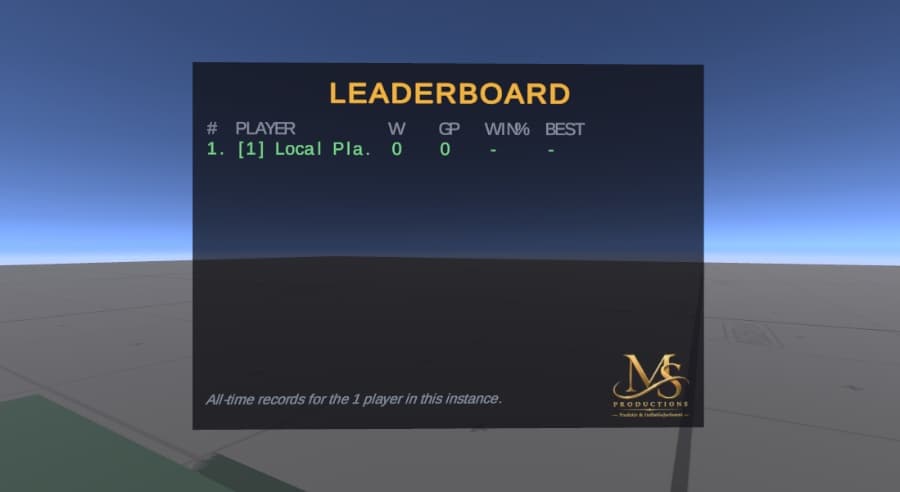
The board faces the throwing area and displays the players currently in the instance using their saved records.
🏆 FEATURES
PLAYER | W | GP | WIN% | BEST
• Games Won • Games Played • Win Rate • Best Game • Automatic ranking • Gold, silver, and bronze for the top three • Green highlight for your own player row • Clean aligned columns • Easy-to-read in-world display
BEST = the fewest throws needed to reach exactly 50.
Players are ranked by Wins → Win Rate → Best Game.
💾 PERSISTENT PLAYER STATS
Player records are saved using VRChat PlayerData.
The system tracks:
• Games played • Games won • Best game / fewest throws
A completed game is counted only once per player, even if the game state is received more than once.
Players who never join the game are not recorded.
🌐 IMPORTANT LIMITATION
This is not a global leaderboard.
VRChat PlayerData can only be read for players currently in the instance. The board therefore ranks the players currently in the world using their saved records.
A worldwide leaderboard would require an external database or web service and is not included.
📦 INCLUDED
• Mölkky persistent leaderboard • Leaderboard prefab • Player statistics tracking • VRChat PlayerData integration • Win tracking • Games played tracking • Best game tracking • Automatic ranking • Top-three styling • Personal player highlight • Installation instructions • License / Terms
🛠️ REQUIREMENTS
• Unity 2022.3 • VRChat Creator Companion • Compatible VRChat SDK • Udon/UdonSharp compatible project • Basic Unity knowledge recommended
📥 INSTALLATION
1. BACK UP YOUR PROJECT
Create a backup of your Unity project before importing.
2. IMPORT
Import the provided Unity package and locate the Mölkky/Leaderboard folder in your Project window.
3. ADD THE LEADERBOARD
Drag the leaderboard prefab into your Mölkky world.
Position and scale it so it faces the throwing area.
4. CONNECT THE GAME
Follow the included README instructions to connect the leaderboard to your Mölkky game manager.
5. BUILD & TEST
Follow the included build instructions and test before publishing.
Verify that:
• Players can join • Games complete correctly • Wins are recorded • Games played updates • Best game updates • Games are not counted twice • Rankings display correctly
⚠️ IMPORTANT
This is a digital product for VRChat world creators.
Please confirm compatibility with your Unity and VRChat setup before purchasing.
The leaderboard has been tested with the Udon runtime and VRChat PlayerData system.
Physical throwing and multi-client behavior should be tested in your own world.
📜 LICENSE & TERMS
By purchasing this product, you agree to these terms.
✅ YOU MAY
• Use the system in personal VRChat worlds. • Use it in public and community worlds. • Use it in commercial VRChat worlds and events. • Modify colors, text, scale, position, and appearance for your own world. • Publish your own VRChat world using the system.
❌ YOU MAY NOT
• Resell the original product or Unity package. • Redistribute, share, or give away the original files. • Upload the package or assets to another website. • Share the files through Discord, social media, or file-sharing services. • Include the original files in another downloadable asset pack. • Extract and sell individual assets. • Claim the original assets as your own creation. • Create or distribute another downloadable product using the original files. • Give the purchased files to anyone who has not purchased the product.
💰 COMMERCIAL USE
Commercial use in your own VRChat world or event is permitted.
Commercial use does not permit resale or redistribution of the original files.
🎨 MODIFICATIONS
You may modify the system for your own VRChat world.
Modified versions may not be redistributed or sold as standalone assets.
👥 SHARING
One purchase is intended for the purchaser.
Anyone who wants to use the system in their own Unity project should purchase their own copy.
🛟 SUPPORT
For installation problems, contact the creator through the BOOTH shop/product contact system.
Please include your Unity version, VRChat SDK version, description of the issue, and screenshots when helpful.
⚖️ DISCLAIMER
This is an independently created VRChat asset and is not affiliated with or officially endorsed by VRChat or VRChat Inc.
The creator is not responsible for issues caused by unsupported Unity versions, incorrect installation, third-party assets, user modifications, or future changes to Unity or VRChat.
💛 THANK YOU!
Thank you for supporting independent VRChat creators!
Enjoy adding persistent Mölkky statistics and competition to your world! 🪵🏆