

Unity Mesh Painter
 ImDannyShop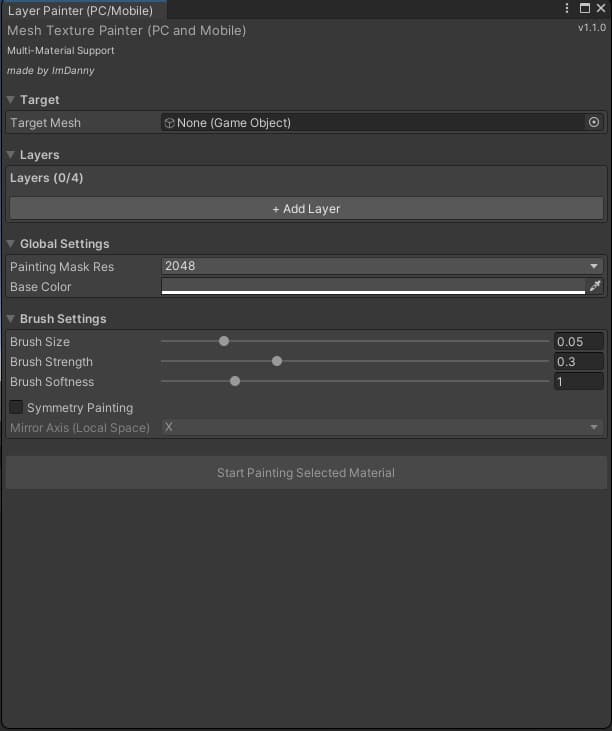
説明
Mesh Layer Painter — Unity Editor Tool
https://youtu.be/Gg1ngSN0Y0M
Ever wanted to paint on a mesh the same way you paint on terrain in Unity? Multiple layers, a brush, just clicking and dragging until it looks right?
Now you can.
Mesh Layer Painter brings that exact terrain-painting workflow to any mesh — avatars, props, whatever. Pick a material slot, grab the brush, paint up to 4 layers directly in the Scene View with a live preview. No external texture painting software, no baking round-trips, no guessing.
The fun part
- 🖌️ Paint like terrain, but on your mesh — brush size, strength, softness, all live
- 🪞 Symmetry brush — paint one side, the other mirrors automatically
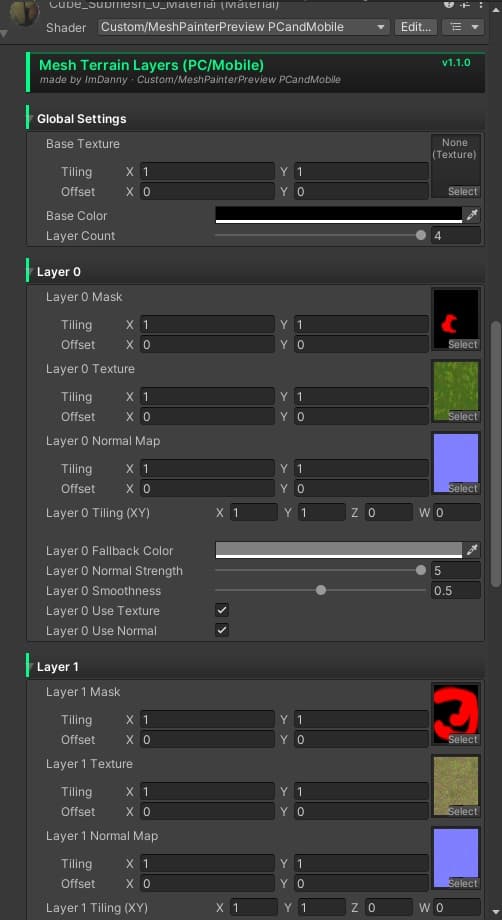
- 🎨 Up to 4 layers per material slot, each with its own texture, normal map, color, smoothness, tiling
- 🧩 Multi-material / submesh aware — body and clothes on one mesh? No problem, each slot gets its own layers
- ↩️ Non-destructive — Cancel reverts instantly, Save bakes it permanently. Your original material is never touched until you say so
The technical part
- ✅ PC + Quest compatible shader mode — shares samplers to stay within Quest's texture-unit limits, drops unnecessary shadow overhead on mobile automatically. Same look on both platforms.
- ✅ Custom Material Inspector, no third-party shader editor dependency
- ✅ Built for BIRP (Built-in Render Pipeline)
- 📐 The only real requirement: a properly UV unwrapped model. No overlaps, no stretching — that's it, that's the whole ask.
Requirements
- Unity (Built-in Render Pipeline / BIRP)
- A properly UV unwrapped mesh with a
Package contents
MeshTexturePainter.cs— Editor window (Tools → Mesh Layer Painter)MeshPainterShaderGUI.cs— custom Material InspectorMeshPainterPreview.shader— PC + Quest compatible layer shaderMeshPainter3Channel.shader— internal brush/paint shader
Notes
- Always test on real Quest hardware before publishing an avatar.
Mesh Layer Painter — Unity エディター拡張
Unity のテレインペイントみたいに、メッシュにも直接ペイントしたいと思ったことはありませんか?複数レイヤーを重ねて、ブラシでドラッグするだけで思い通りの見た目に……。
それ、できます。
Mesh Layer Painter は、あのテレインペイントのワークフローを どんなメッシュにも 持ち込みます——アバターでも、小物でも。マテリアルスロットを選んで、ブラシを握って、シーンビュー上で最大4レイヤーをリアルタイムプレビューしながら直接ペイント。外部ソフトも、ベイクの往復も、勘に頼る必要もありません。
楽しいポイント
- 🖌️ テレインペイントのように、でもメッシュに — ブラシサイズ・強さ・柔らかさ、すべてリアルタイム
- 🪞 シンメトリーブラシ — 片側をペイントすれば、もう片方は自動でミラーリング
- 🎨 マテリアルスロットごとに最大4レイヤー、それぞれ独自のテクスチャ・ノーマルマップ・カラー・滑らかさ・タイリングを設定可能
- 🧩 マルチマテリアル/サブメッシュ対応 — ボディと衣装が1つのメッシュにまとまっていても問題なし、スロットごとに独立したレイヤーを持てます
- ↩️ 非破壊ワークフロー — Cancel で即座に元に戻り、Save で恒久的に保存。明示的に保存するまで元のマテリアルには一切触れません
技術的なポイント
- ✅ PC + Quest 対応シェーダーモード — サンプラーを共有して Quest のテクスチャユニット制限内に収め、モバイルでは不要なシャドウ処理を自動的に省略。両プラットフォームで見た目は同じです。
- ✅ サードパーティのシェーダーエディターに依存しないカスタムマテリアルインスペクター
- ✅ BIRP(Built-in Render Pipeline)向けに構築
- 📐 本当に必要なものはこれだけ:きちんと UV 展開されたモデル。 重なりや歪みがなければ、それで十分です。
必要環境
- Unity(Built-in Render Pipeline / BIRP)
- きちんと UV 展開されたメッシュ
パッケージ内容
MeshTexturePainter.cs— エディターウィンドウ(Tools → Mesh Layer Painter)MeshPainterShaderGUI.cs— カスタムマテリアルインスペクターMeshPainterPreview.shader— PC + Quest 対応レイヤーシェーダーMeshPainter3Channel.shader— 内部ブラシ/ペイント用シェーダー
注意事項
- アバターを公開する前に、必ず実機の Quest でテストしてください。