
前髪かげメーカー - 前髪の影が顔に落ちて、髪が揺れると影も動く。対応アバター一覧の要らない前髪の影【JA,EN,KO】
 ラスキンの研究所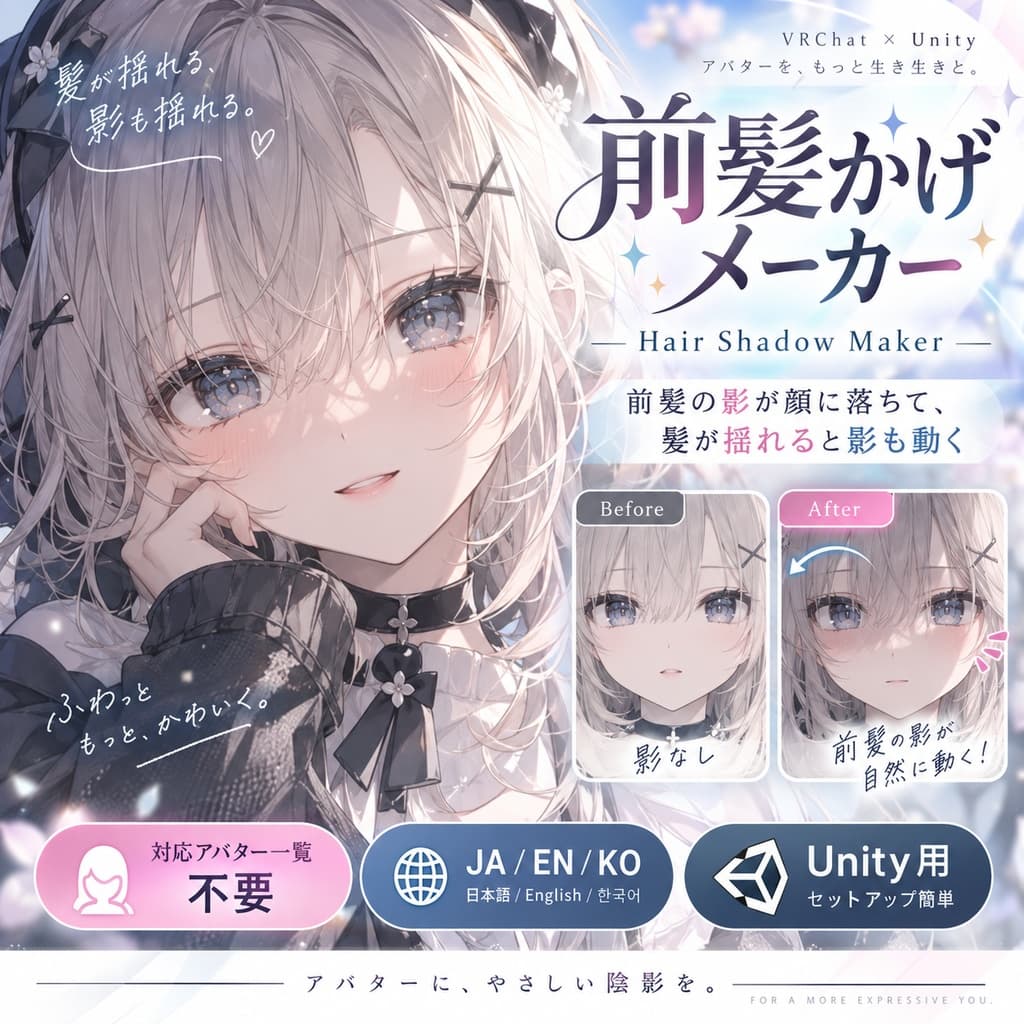
説明
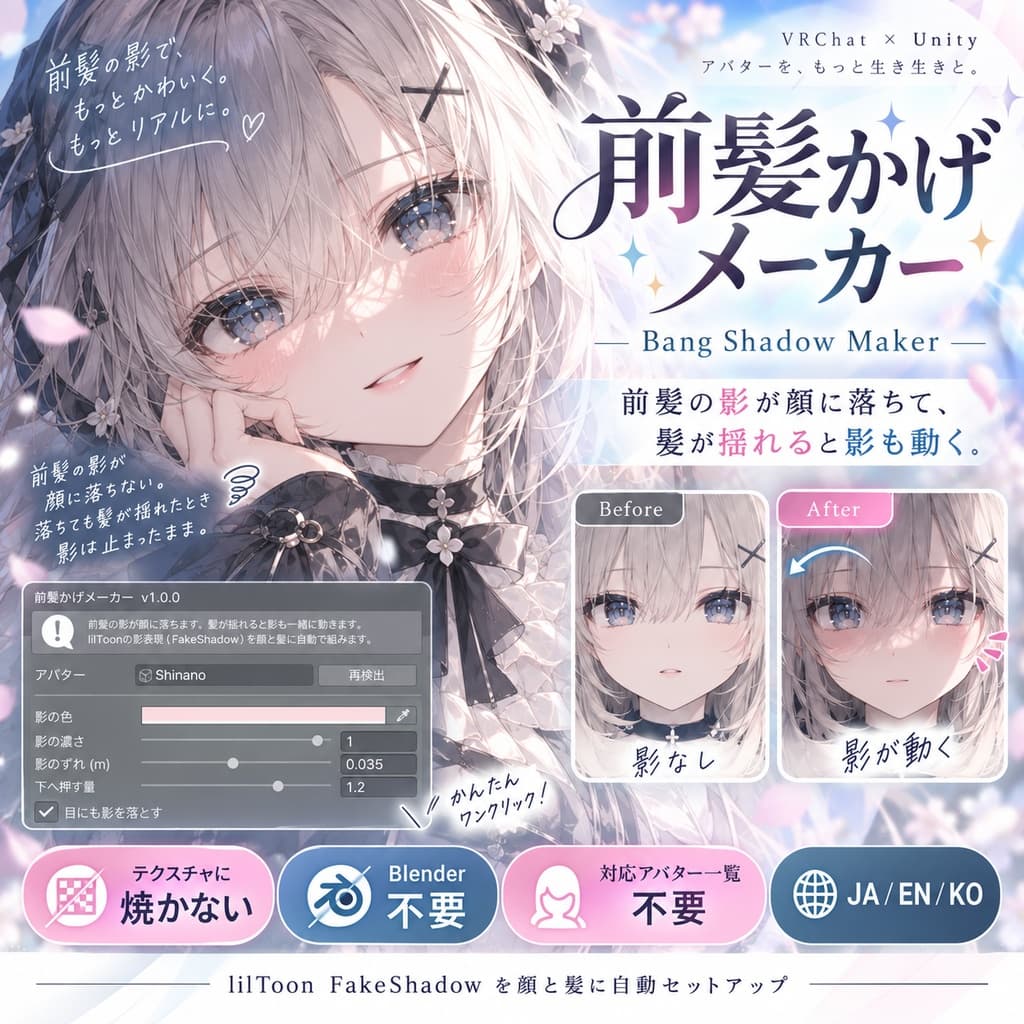
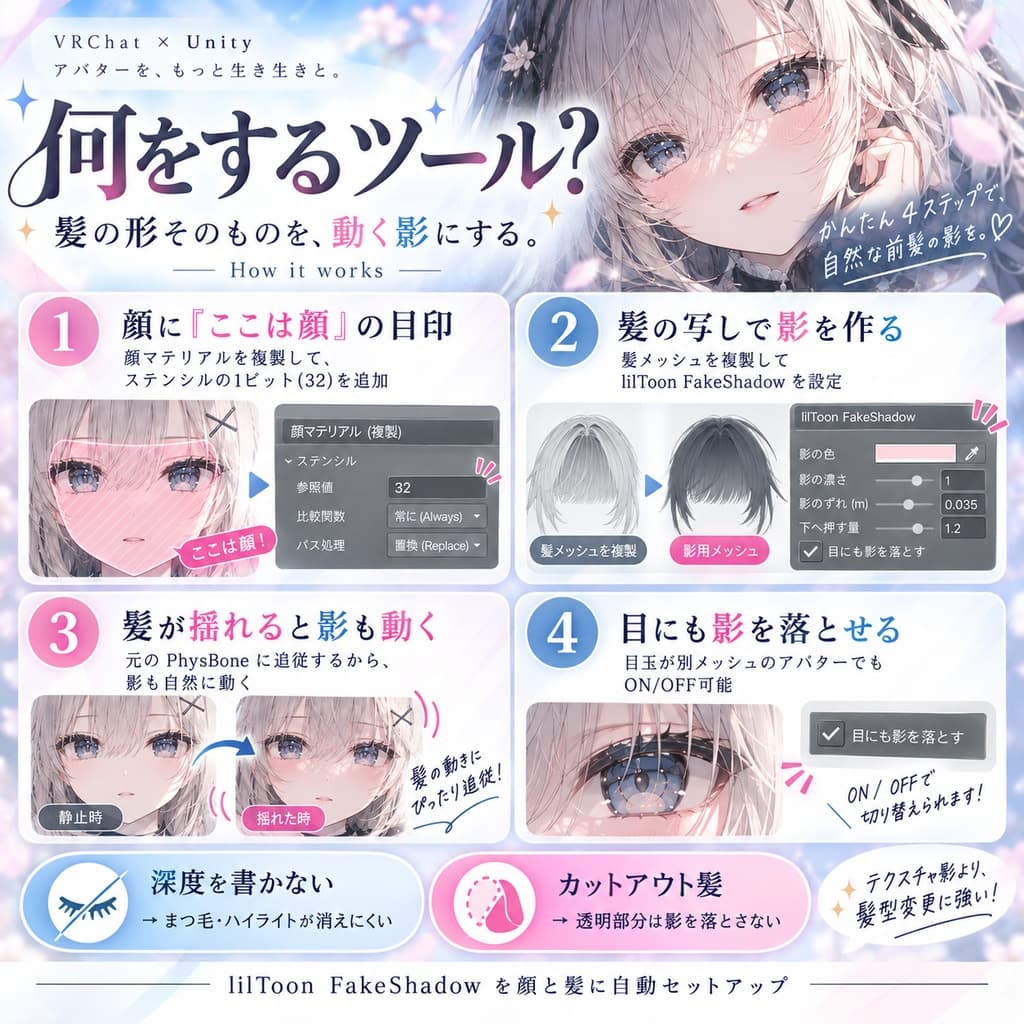
「前髪の影が顔に落ちない。落ちても髪が揺れたとき影は止まったまま」。 前髪かげメーカーは、前髪の影が顔に落ちて、髪が揺れると影も一緒に動くようにするUnity Editorツールです。lilToon の影落とし(FakeShadow)を顔と髪に自動で組みます。テクスチャには焼きません。Blenderは使いません。 顔と髪は自動で見つけるので、対応アバター一覧は要りません。
◆ 何をするのか ・顔のマテリアルを複製して、ステンシルの1ビット(32)に「ここは顔」と書かせます。既にステンシルを使う材質には、そのビットだけ足します。 ・髪のメッシュを同じ骨で複製し、lilToon の FakeShadow マテリアルを付けます。写しは光の向きへ少しずれて描かれ、「顔」のビットがある所にだけ乗ります。それが影です。 ・髪は元の PhysBone で揺れるので、写しも同じに揺れ、影が動きます。 ・目玉が別メッシュのアバターでは、目の上にも影が落ちます(アニメの前髪の影)。切れます。
◆ 影のテクスチャとの違い 顔のテクスチャに影を描く方法は、髪が揺れても影が動かず、髪型を替えると合わなくなります。この道具は髪の形そのものを影にするので、髪型を替えたら作り直すだけで合います。
◆ 設計上の判断 ・写しは「下へ押す量」のぶん、光の向きに関わらず下と前へ押します。光が真上のワールドで写しが顔の中へ入って隠れるのを防ぐためです(実物のしなので実際に隠れました)。 ・写しは深度を書きません。まつ毛やハイライトが影の下で消えないためです。 ・カットアウトの髪は、テクスチャの透明な所を影から外した絵を作って使います。
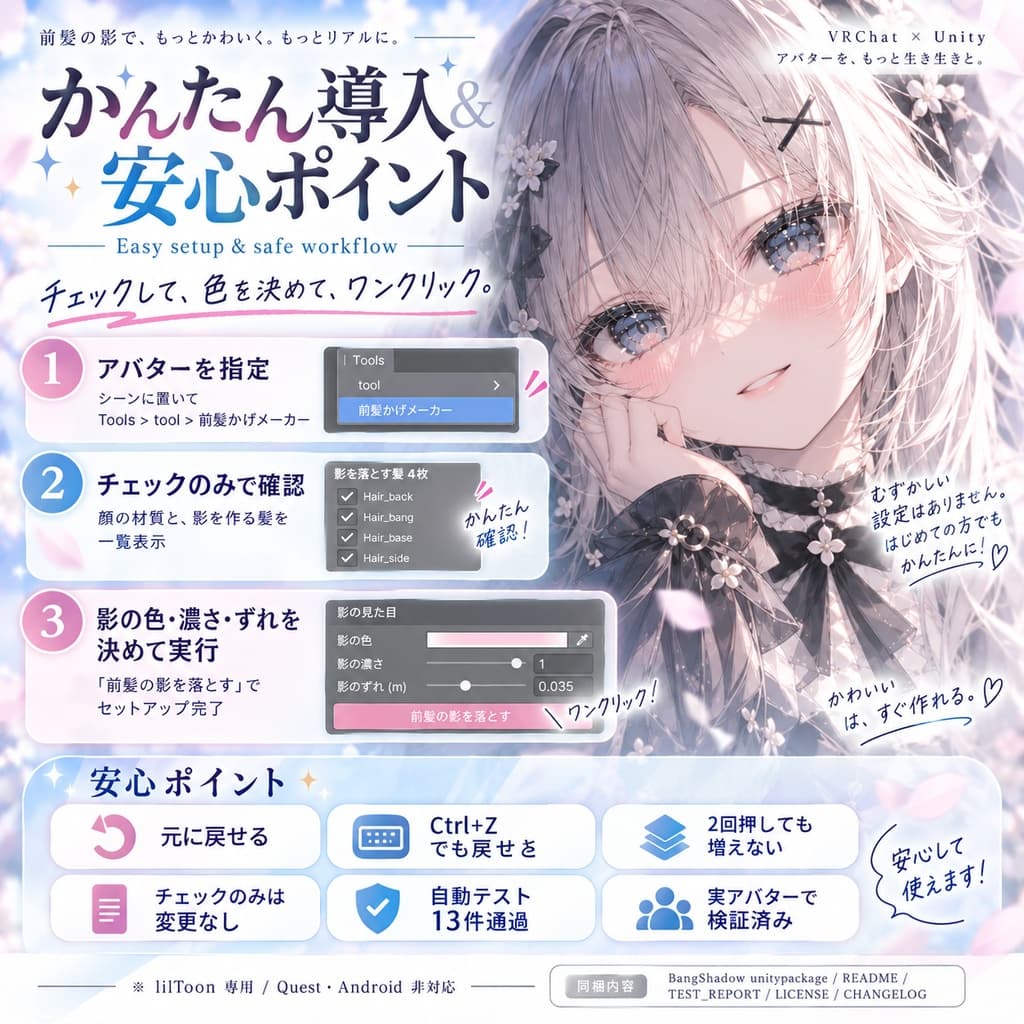
◆ 元に戻せます ・「元に戻す」で顔(と目)のマテリアルを元へ戻し、髪の写しを消します。実行直後なら Ctrl+Z でも戻ります ・2回押しても増えません。「チェックのみ」は何も書き換えません
◆ 使い方
- unitypackage をインポート
- アバターをシーンに置き、Tools > tool > 前髪かげメーカー を開く
- アバターを指定し「チェックのみ(変更しない)」で、影を受ける顔の材質と影を作る髪を見る
- 影の色・濃さ・ずれを決めて「前髪の影を落とす」を押す
◆ 検証 ・自動テスト 13件 全通過(模擬SDKを入れた Unity 2022.3) ・実物のアバターを本物の lilToon で描いて、入れる前後の画素を数えました Felis: 暗くなった画素 41,964(平均 -79.2/255)、明るくなった画素 0 しなの: 暗くなった画素 93,937、明るくなった画素 0(着せ替え・衣装2種も同じ) ・元に戻したあとの絵は、入れる前の絵と同じ(違う画素 50 未満)
※ 顔か髪のマテリアルが lilToon でないアバター(Quest / Android 版を含む)には入れられません。 ※ 影の見え方はワールドの光の向きで変わります。濃さと色はスライダーで直せます。 ※ アバター本体、lilToon、VRChat SDK は付属しません。 ※ デジタル商品のため、購入後の返品・返金はできません。
内容物: BangShadow unitypackage / README / TEST_REPORT / LICENSE / CHANGELOG / ツール画面のスクリーンショット
■ バリエーション(言語ごとに1つ。それぞれに下のZIPを設定。自動入力ツールは読まない) 日本語 日本語版_前髪かげメーカー_v1.0.0.zip English English_Bang Shadow Maker_v1.0.0.zip 한국어 한국어판_앞머리 그림자 메이커_v1.0.0.zip
--- English ---
"The bangs cast no shadow on the face, and when they do, the shadow stays still while the hair sways." Bang Shadow Maker is a Unity editor tool: the bangs cast a shadow on the face, and the shadow moves with the hair. It sets up lilToon's FakeShadow on the face and hair automatically. Nothing is baked into textures. No Blender. The face and hair are found automatically, so no compatibility list is needed.
◆ What it does
- Face materials are duplicated and write one stencil bit (32) meaning "this is the face". Materials already using the stencil only get the bit added.
- Hair meshes are duplicated on the same bones with lilToon's FakeShadow material. The copy draws shifted along the light, only where the face bit is set. That is the shadow.
- The hair sways on its original PhysBones, so the shadow moves with it.
- On avatars whose eyeballs are a separate mesh, the shadow falls over the eyes too (anime style). Can be turned off.
◆ Compared with a painted shadow texture A shadow painted into the face texture does not move with the hair and stops matching when you change hairstyles. This tool uses the hair shape itself, so a new hairstyle only needs a rebuild.
◆ Design choices
- "Push down" pushes the copy down and forward regardless of the light, so it does not sink into the head when the world light is overhead (it did on a real Shinano).
- The copy writes no depth, so eyelashes and highlights stay visible under the shadow.
- Cutout hair gets a shadow texture built from its alpha, so transparent parts cast nothing.
◆ Revertible
- "Revert" restores the face (and eye) materials and removes the hair copies; Ctrl+Z works right after running
- Running twice does not duplicate; "Check only" writes nothing
◆ How to use
- Import the unitypackage and open Tools > tool > Bang Shadow Maker with the avatar in the scene
- Set the avatar and press "Check only" to see the face materials and hair meshes
- Choose color, strength and offset, then press "Cast the bang shadow"
◆ Verification
- 13 automated tests passed (Unity 2022.3 with a mock SDK)
- Real avatars rendered with real lilToon, pixels counted before and after: Felis 41,964 darkened pixels (mean -79.2/255), Shinano 93,937; lightened pixels 0
- The render after Revert equals the original (fewer than 50 pixels differ)
- Avatars whose face or hair materials are not lilToon (including Quest / Android) are not supported.
- How the shadow looks depends on the world's light direction; strength and color are sliders.
- The avatar, lilToon and the VRChat SDK are not included. Digital product; no refunds.
Contents: BangShadow unitypackage / README / TEST_REPORT / LICENSE / CHANGELOG / tool window screenshot
--- 한국어 ---
"앞머리 그림자가 얼굴에 떨어지지 않는다. 떨어져도 머리카락이 흔들릴 때 그림자는 멈춰 있다." 앞머리 그림자 메이커는 앞머리 그림자가 얼굴에 떨어지고, 머리카락이 흔들리면 그림자도 함께 움직이게 하는 Unity Editor 툴입니다. lilToon의 FakeShadow를 얼굴과 머리카락에 자동으로 구성합니다. 텍스처에는 굽지 않습니다. Blender는 쓰지 않습니다. 얼굴과 머리카락은 자동으로 찾으므로 대응 아바타 목록이 필요 없습니다.
◆ 무엇을 하는가 ・얼굴 머티리얼을 복제하여 스텐실 1비트(32)에 「여기는 얼굴」이라고 쓰게 합니다. 이미 스텐실을 쓰는 머티리얼에는 그 비트만 더합니다. ・머리카락 메시를 같은 본으로 복제하고 lilToon의 FakeShadow 머티리얼을 붙입니다. 복사본은 빛 방향으로 어긋나게 그려지고 「얼굴」 비트가 있는 곳에만 얹힙니다. 그것이 그림자입니다. ・머리카락은 원래 PhysBone으로 흔들리므로 그림자도 함께 움직입니다. ・눈알이 별도 메시인 아바타에서는 눈 위에도 그림자가 집니다(애니메이션풍). 끌 수 있습니다.
◆ 설계상의 판단 ・「아래로 미는 양」만큼 빛 방향에 관계없이 복사본을 아래와 앞으로 밉니다. 빛이 바로 위인 월드에서 복사본이 얼굴 안으로 들어가 숨는 것을 막기 위해서입니다. ・복사본은 깊이를 쓰지 않습니다. 속눈썹과 하이라이트가 그림자 아래에서 사라지지 않게 하기 위해서입니다.
◆ 되돌릴 수 있습니다 ・「되돌리기」로 얼굴(과 눈) 머티리얼을 원래대로 하고 머리카락 복사본을 지웁니다. 실행 직후라면 Ctrl+Z ・두 번 눌러도 늘지 않음. 「확인만」은 아무것도 쓰지 않음
◆ 사용법
- unitypackage 임포트, 아바타를 씬에 놓고 Tools > tool > 앞머리 그림자 메이커 를 연다
- 아바타를 지정하고 「확인만」으로 얼굴 머티리얼과 머리카락 메시를 확인
- 색·진하기·어긋남을 정하고 「앞머리 그림자 넣기」를 누른다
◆ 검증 ・자동 테스트 13건 전부 통과(모의 SDK를 넣은 Unity 2022.3) ・실제 아바타를 실제 lilToon으로 그려 전후 픽셀을 셈: Felis 어두워진 픽셀 41,964(평균 -79.2/255), 시나노 93,937. 밝아진 픽셀 0 ・되돌린 뒤의 그림은 원래 그림과 같음(다른 픽셀 50 미만)
※ 얼굴이나 머리카락 머티리얼이 lilToon이 아닌 아바타(Quest / Android 판 포함)에는 넣을 수 없습니다. ※ 그림자의 모습은 월드의 빛 방향에 따라 달라집니다. 진하기와 색은 슬라이더로 고칠 수 있습니다. ※ 아바타 본체, lilToon, VRChat SDK는 포함되지 않습니다. 디지털 상품이므로 반품·환불은 불가합니다.
내용물: BangShadow unitypackage / README / TEST_REPORT / LICENSE / CHANGELOG / 툴 화면 스크린샷