

【VRChat】Animation再生 - 複数アニメーションをメニュー付きPrefabでアバターにポン入れ&まとめて再生確認できるUnityエディタ拡張
 Riruchan 3D
説明
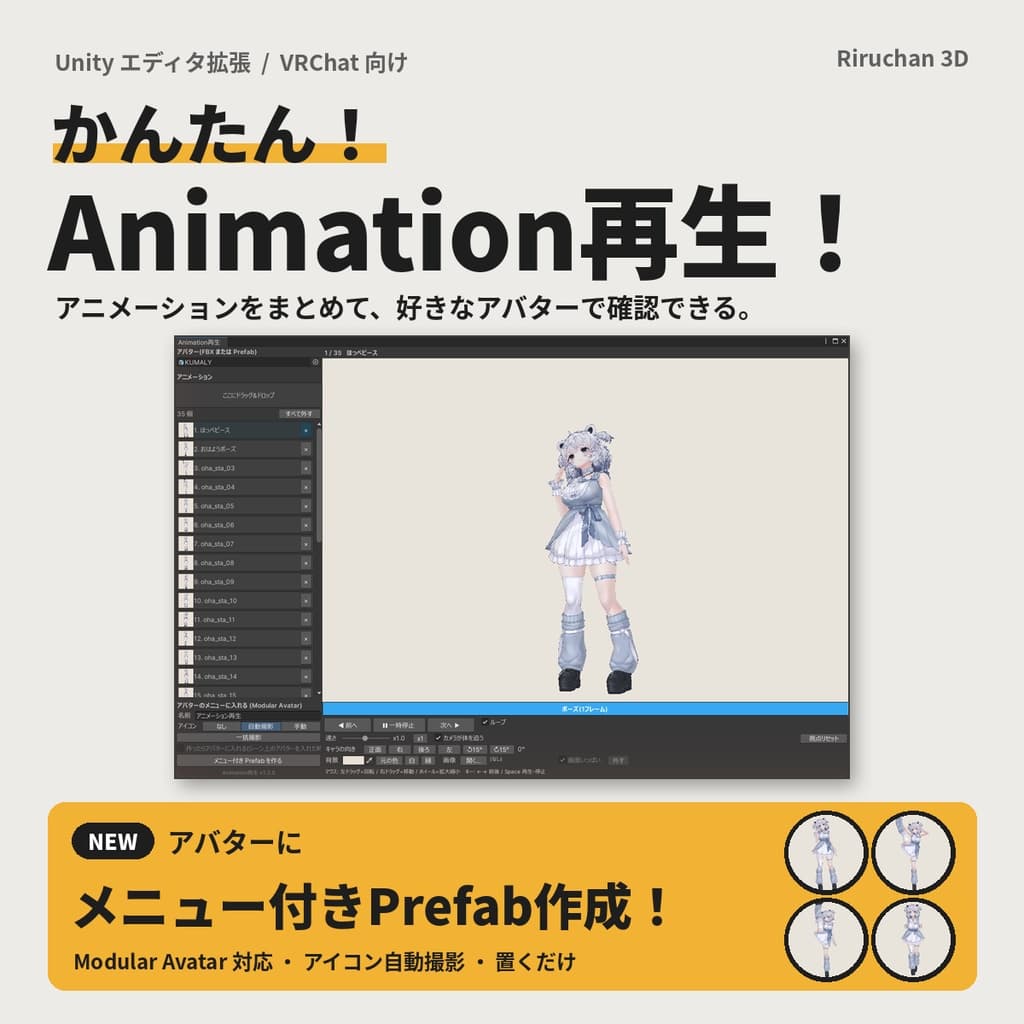
■ 商品概要 たくさんのアニメーションを、アバターに「メニュー付き Prefab」でポン入れできる Unity エディタ拡張です。
アニメーションをまとめてドラッグ&ドロップ → 「メニュー付き Prefab を作る」を押す → アバターの中に入れるだけ。 Modular Avatar 対応なので、VRChat の Expression Menu から好きなアニメーションを選んで再生できます。 何個でもまとめて入れられ(最大255個・8個ずつページ分け)、メニューの名前とアイコンもその場で決められます。
入れる前の確認もこの1つのウィンドウで。 「次へ ▶」を押すだけで、アニメーションを1本ずつアバターで再生して見比べられます。 モーションやポーズ集を買ったけど、どれがどんな動きか分からない…という時にも便利です。
※商品画像に写っているアバター・ポーズは付属しておりません。
■ 主な機能
【アバターにポン入れ(Modular Avatar)】
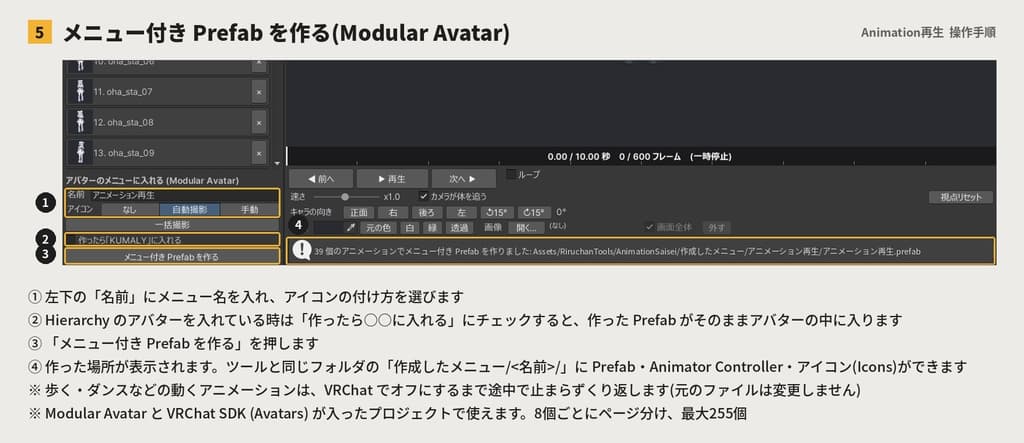
複数のアニメーションから、メニュー付き Prefab をボタン1つで作成
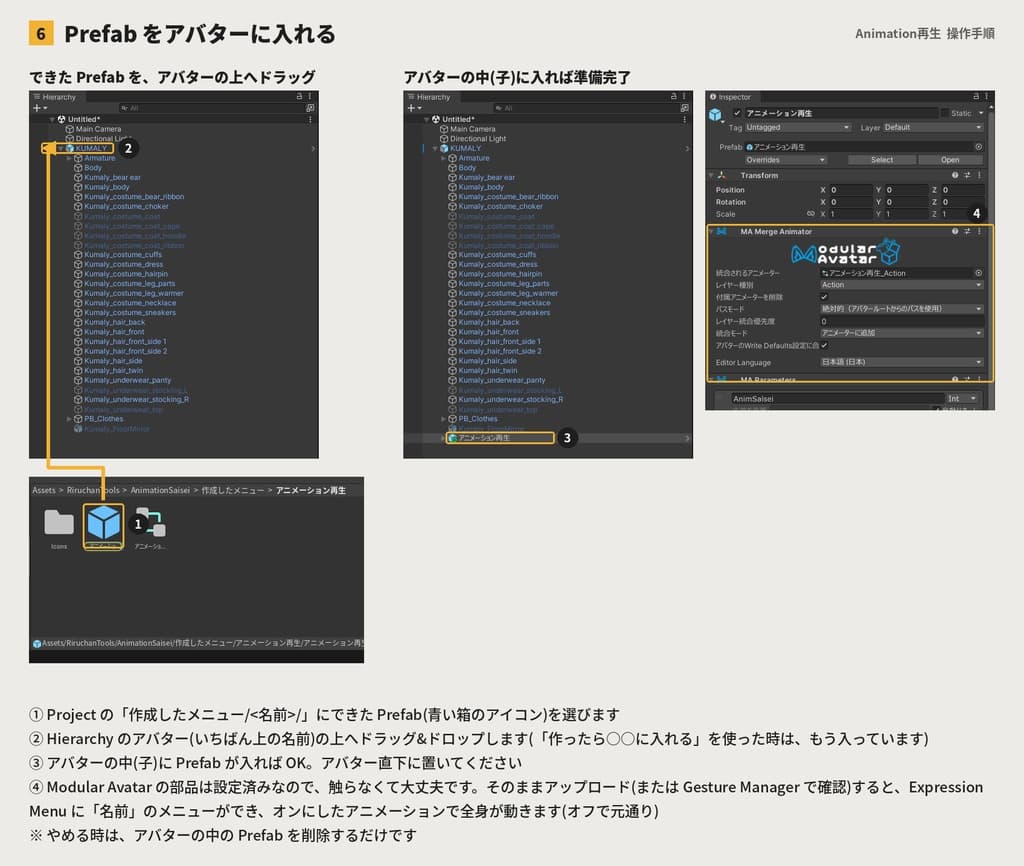
Expression Menu に1つずつトグルで並びます(9個以上はページ分け・最大255個)
歩く・ダンスなどの動くアニメーションは、オフにするまで途中で止まらずくり返し再生
Action レイヤーで再生するので、普段の歩きなどはそのまま
VR でも頭・手・腰・足・指はアニメーションの位置で固定されるので、ポーズが崩れません(目と口はそのまま)
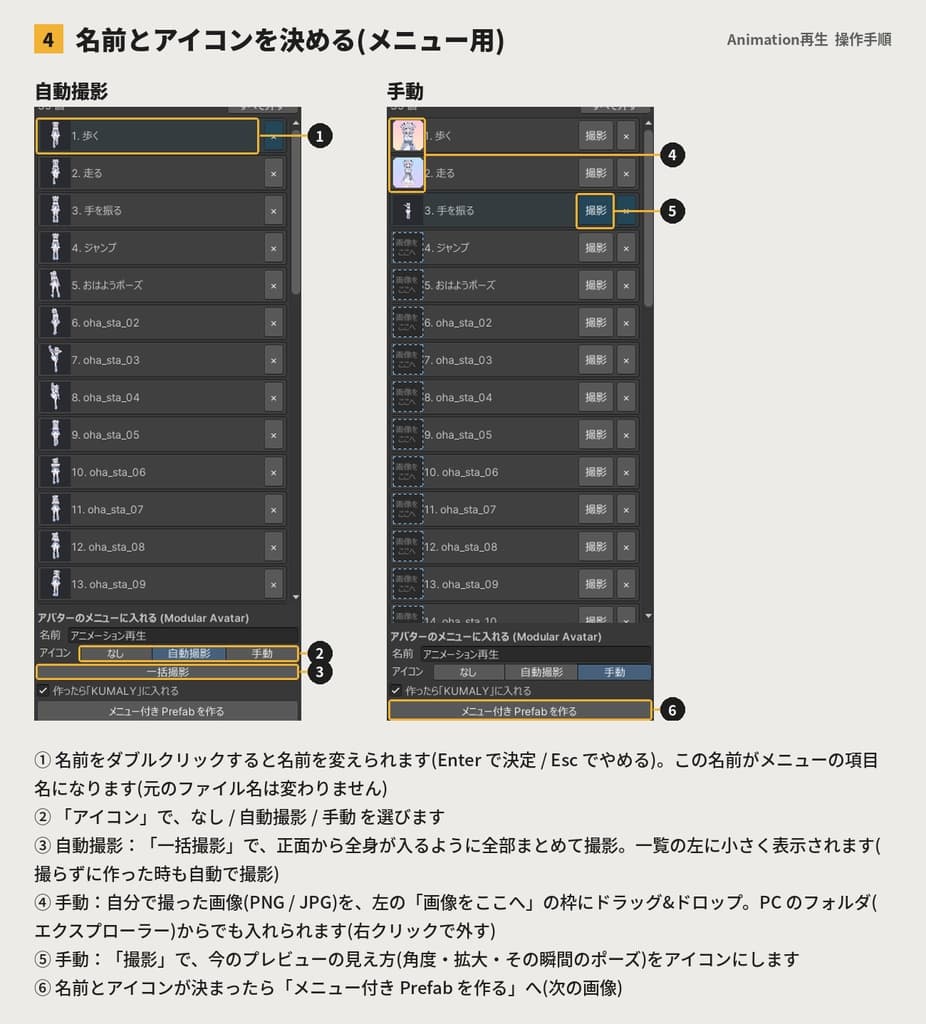
メニューの名前:一覧の名前をダブルクリックで変更
メニューのアイコン:なし/自動撮影(正面・全身で一括)/手動(その場で撮影 or 自分で撮った画像をドラッグ&ドロップ)
作った Prefab・アイコンはツールと同じフォルダにまとめて保存(探しやすい)
【アニメーションの確認】
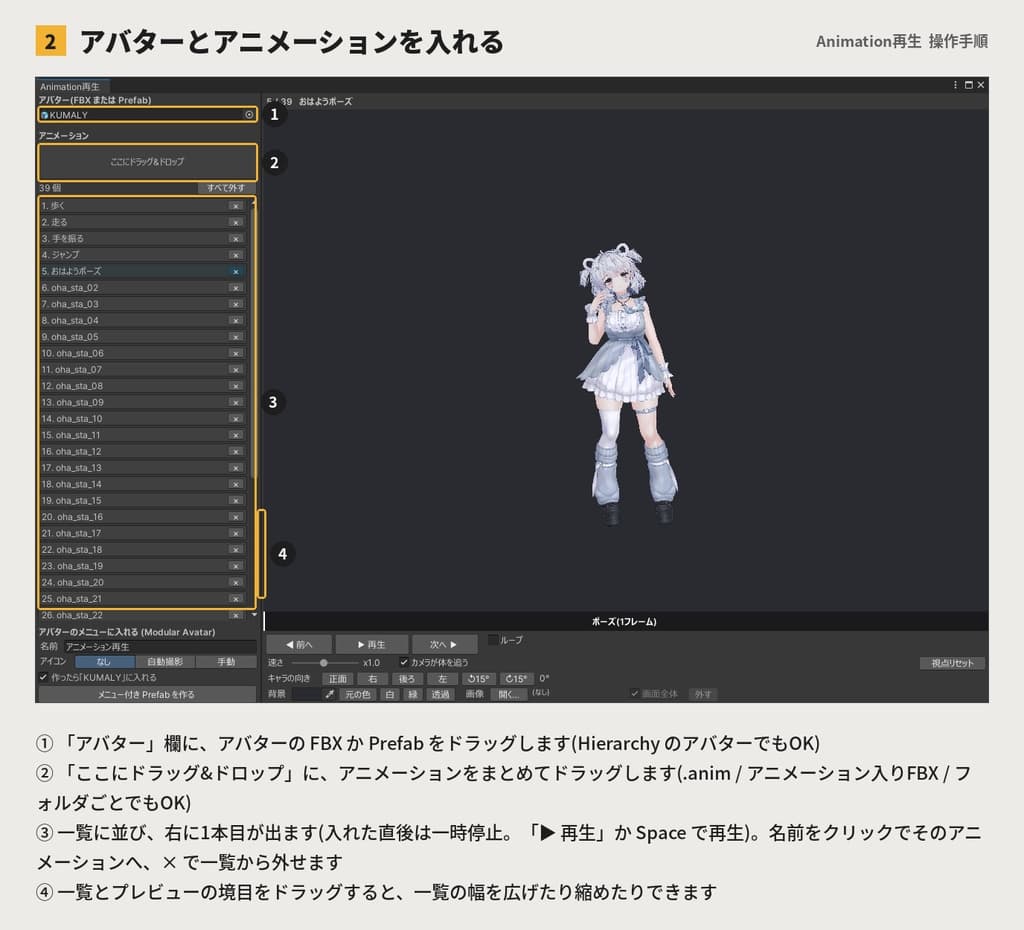
アニメーションをまとめて追加(複数選択・フォルダごと・アニメーション入りFBXに対応)
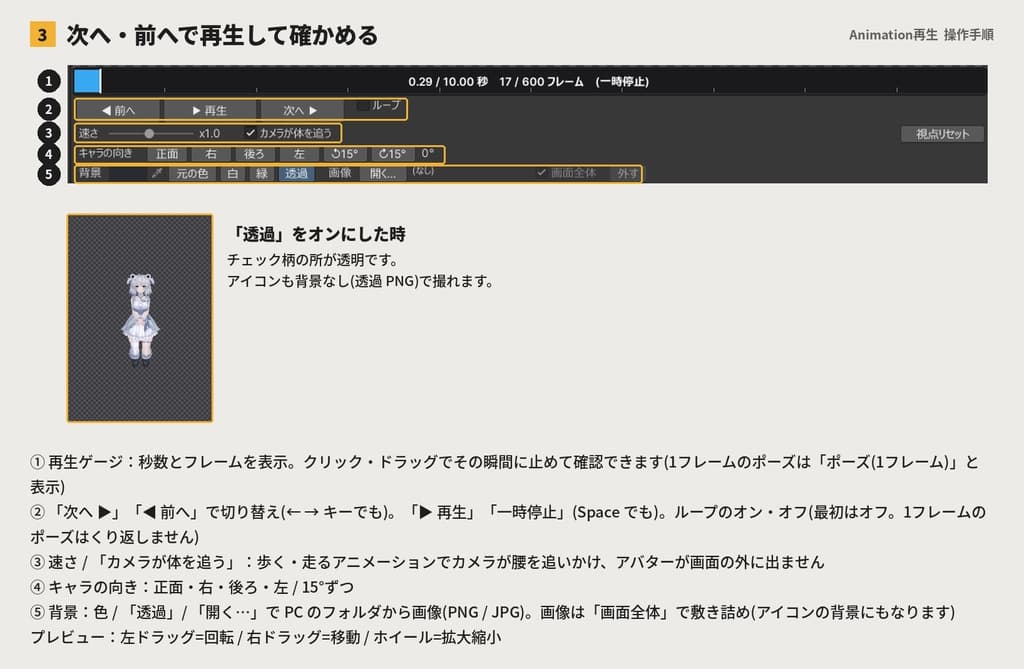
「次へ ▶」「◀ 前へ」(← → キー)で切り替え、1フレームのポーズ集もそのまま確認
見やすい再生ゲージ(秒数・フレーム表示。クリックでその瞬間に止めて確認)
キャラクターの向き、カメラの回転・移動・拡大、「カメラが体を追う」
背景は好きな色・画像・透過(アイコンも透過 PNG で撮影可)
一覧とプレビューの境目はドラッグで幅を変更
アバター・アニメーションの元ファイルは一切変更しません
■ 動作環境
Unity 2022.3 系(VRChat 推奨バージョン)
作成環境:Unity 2022.3.22f1 / Windows
メニュー付き Prefab の作成には VRChat SDK (Avatars) と Modular Avatar が必要です
(確認の機能だけなら他のツールは不要です)
エディタ専用ツールのため、アバターのアップロードには含まれません
■ 同梱物
AnimationSaisei_v1.3.0.unitypackage
README.txt(導入方法・使い方・よくある質問)
操作手順の画像 6枚
■ 導入手順
ダウンロードしたZIPファイルを解凍し、中にある .unitypackage をUnityプロジェクトにインポートします。
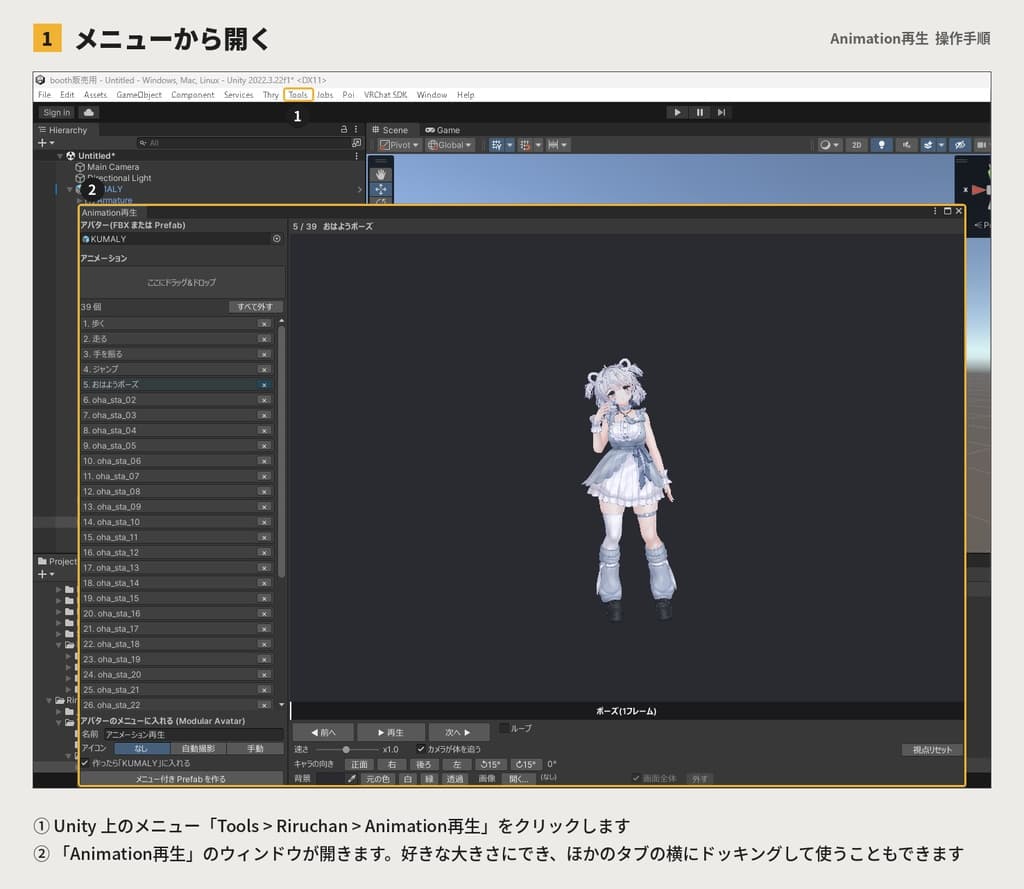
メニューの「Tools > Riruchan > Animation再生」でウィンドウを開きます。
アバターを「アバター」欄に、アニメーションを「ここにドラッグ&ドロップ」の枠に入れます。
左下の「メニュー付き Prefab を作る」を押し、できた Prefab をアバターの中に入れるだけです。
詳しくは同梱の README.txt と操作手順の画像をご覧ください。
■ 利用規約
個人利用:可能
商用利用:可能(購入者ご本人の制作作業での使用に限る)
改変:可能(ご自身で使用するためのスクリプト改変に限る)
再配布・再販売:不可
本商品の著作権は製作者(Riruchan)に帰属します。
改変の有無を問わず、自作発言および本ツールの再配布・転売・共有・他の商品への同梱を禁止します。
このツールで確認・撮影したものの利用に制限はありません。(※アバター・アニメーション側の利用規約は必ず遵守してください)
■ 注意事項
ヒューマノイドのアニメーションは、アバターの Rig が Humanoid の時に再生できます。Legacy 設定のアニメーションは使えません。
他のエモート・ポーズ系ギミックと同じ Action レイヤーを使うため、同時には再生できません。
プレビュー画面では PhysBone などの揺れものは動きません。(Unity のプレビューの仕様です)
ダウンロード商品の性質上、購入後の返金対応はいたしかねます。
本製品の使用に起因するトラブル・損失・損害について、製作者は一切の責任を負いません。(ご使用前にプロジェクトのバックアップをおすすめします)
ご不明な点は、BOOTHメッセージよりお気軽にお問い合わせください。
■ Overview A Unity editor extension that turns many animations into a "menu prefab" you can simply drop onto your avatar. Drag & drop your animations, press "メニュー付き Prefab を作る" (Create menu prefab), and place the prefab inside your avatar. Compatible with Modular Avatar — pick any animation from the VRChat Expression Menu. You can also preview the animations one by one on your avatar in the same window.
Please note: The avatar and poses shown in the images are not included.
■ Main Features
One-click Modular Avatar menu prefab from multiple animations (toggle per animation, 8 per page, up to 255)
Moving animations (walk, dance) keep looping in VRChat until you turn them off
Plays on the Action layer — your normal locomotion is unchanged
In VR, head, hands, hips, feet and fingers follow the animation while it plays, so the pose stays intact (eyes and mouth unchanged)
Rename menu items by double-clicking / Icons: none, auto capture, or manual (capture or drag & drop your own image)
Generated files are saved inside the tool folder
Preview: bulk add, Next/Prev (← → keys), playback gauge, camera controls, background color / image / transparent
Your avatar and animation files are never modified
■ Environment Requirements
Unity 2022.3 (developed with 2022.3.22f1 / Windows)
Menu prefab: VRChat SDK (Avatars) + Modular Avatar (preview needs no other tools)
Editor-only tool — not included in avatar uploads
■ Terms of Use
Personal / Commercial Use: Allowed (purchaser's own production work only)
Modification: Allowed (scripts, for your own use only)
Redistribution / Resale / Sharing / Bundling: Prohibited
Copyright belongs to the creator (Riruchan). Claiming this work as your own is prohibited.
■ Notes
Humanoid animations require a Humanoid rig. Legacy animations are not supported.
The menu prefab uses the Action layer, so it cannot play together with other emote/pose gimmicks.
No refunds after purchase (digital product). The creator accepts no responsibility for any loss or damage.
If you have any questions, please feel free to reach out via BOOTH message.